After adding the sap package on the Tizen 4 emulator, you may get the following error message :
Extra package installation is failed. sap must be installed MANUALLY.
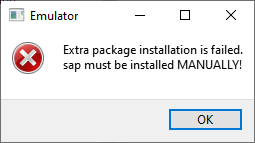
- Extra package installation is failed. sap must be installed MANUALLY!
https://github.com/Samsung/Tizen.NET/issues/54 - Wearable 4.0: Extra package installation is failed! Sap must be installed Manually!
https://forum.developer.samsung.com/t/wearable-4-0-extra-package-installation-is-failed-sap-must-be-installed-manually/2498
Procedure
-
Copy packages from the host computer to the target.
> sdb push [tizen_sdk_path]\platforms\tizen-4.0\wearable\emulator-images\add-ons\sap /tmp/.emulator/apps/sap -
Switch to root mode
> sdb root on -
Remount filesystem as Read/Write
> sdb shell mount -o rw,remount / -
Install sap
> sdb shell rpm -Uvh /tmp/.emulator/apps/sap/sap-1.9.5-0.i686.rpm
After emulator reboot, AccessoryService Emulator on Android Device is connected.